scientific literature CODE with speed and clarity
Get a headstart in replicating computational piplines used to generate figures in scientific papers with a Gemini-powered click.
Generate code with a
Gemini-powered click
Simple Upload
Upload a picture of your figure of interest
Upload a screenshot
Figure:
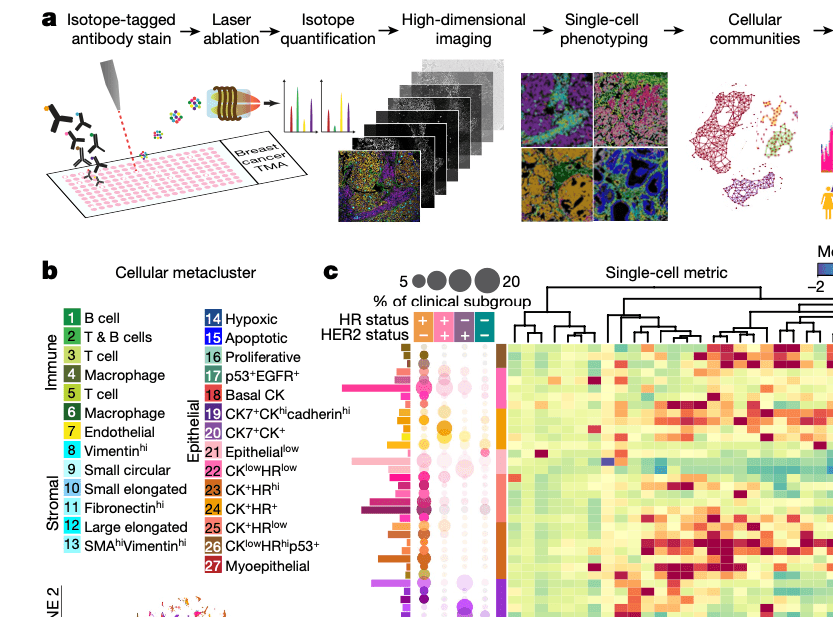
Multi-packed Code: One Figure, Multiple Plots
Generate code for multiple plots from a single figure
# Plot the heatmap
  data = np.random.rand(27, 30)
  fig,ax=plt.subplots(figsize=(10,10))
  sns.heatmap(data, annot=False, cmap='viridis', ax=ax)
# Create the dendogram
Z = np.random.rand(27, 27)fig, ax = plt.subplots(figsize=(5,5))
dendogram=dendogram(Z, orientation='right', labels=labels)Get code in multiple languages
Python, Matlab, R, Java, C++
Python
 fig, ax = plt.subplots(figsize=(5,5))
   sns.scatter(x, y, s-10, c= np.random.rand(1000), alpha=0.5)
fig, ax = plt.subplots(figsize=(10, 6))
sns.heatmap(data, ax=ax, cmap='viridis', annot=False fig, ax = plt.subplots(figsize=(10, 6))
sns.heatmap(data, ax=ax, cmap='viridis', annot=False Matlab
 figure('Position', [100, 100, 500, 500]);
   scatter(x, y, 10, rand(1000, 1), 'filled', 'MarkerFaceAlpha', 0.5)
figure('Position', [100, 100, 1000, 600]);
ax = axes;
heatmap(ax, data, 'Colormap', viridis, 'CellLabelColor', 'none') figure('Position', [100, 100, 1000, 600]);
ax = axes;
heatmap(ax, data, 'Colormap', viridis, 'CellLabelColor', 'none') R
 library(ggplot2)
   fig <- ggplot()+
    geom_point(aes(x = x, y = y), size = 10, alpha = 0.5, color = rgb(runif(1000), runif(1000), runif(1000)))
data_melted <- melt(data)
ggplot(data_melted, aes(Var1, Var2, fill=value)) +
geom_tile() + scale_fill_viridis_c() + theme_minimal()
theme(axis.text.x = element_text(angle=45, hjust=1)) data_melted <- melt(data)
ggplot(data_melted, aes(Var1, Var2, fill=value)) +
geom_tile() + scale_fill_viridis_c() + theme_minimal()
theme(axis.text.x = element_text(angle=45, hjust=1)) Java
 g.setColor(new Color(rand.nextFloat(), rand.nextFloat(), rand.nextFloat(), 0.5f));
  g.fillOval(x,y, 10, 10);
 JFrame frame = new JFrame('Heatmap');
  frame.setSize(800, 600);
   XYDataset dataset = createDataset();
  JFreeChart chart = ChartFactory.createXYLineChart('Heatmap', 'X-Axis', 'Y-Axis', dataset, PlotOrientation.VERTICAL, false, true, false)
JFrame frame = new JFrame('Heatmap');
frame.setSize(800, 600);
XYDataset dataset = createDataset();
JFreeChart chart = ChartFactory.createXYLineChart('Heatmap', 'X-Axis', 'Y-Axis', dataset, PlotOrientation.VERTICAL, false, true, false) C++
Succint accompanying explanations
Obtain succint explanations for each piece of code related to a particular plot
Plot 1 (Heatmap with dendogram): This plot shows the heatmap of single-cell metrics across different cellular metaclusters....
Plot 2 (Scatter plot): This plot represents the t-SNE embedding of cells in a 2-dimensional space. Each dot represents a cell, and its represents its assigned cluster.